How to Preview Embroidery Files Without Opening Software
Complete, honest tutorial for viewing PES, DST, JEF, and 40+ embroidery formats directly in File Explorer and Finder. Compare free vs paid options with transparent pricing and real-world tests.
By Jennifer Torres
Embroidery Software Specialist • 15+ years experience
⏱ Updated: January 23, 2026
⚠️ TRANSPARENT PRICING NOTICE:
This tutorial covers BOTH free and paid embroidery file preview tools. When software costs money, the price is clearly stated. Embrilliance Thumbnailer is a PAID product ($44.95 USD). Free alternatives are also explained in detail below.
Why You Need Embroidery File Preview
If you've ever struggled to find the right design among hundreds of cryptically named files like "DST00234.dst" or "design_final_v2.pes", you understand the frustration. Opening each file individually in embroidery software wastes valuable time and disrupts your creative workflow.
This comprehensive, honest guide shows how to enable instant preview thumbnails for embroidery files. It compares both free and paid options with transparent pricing and notes from real projects where these tools have saved hours.
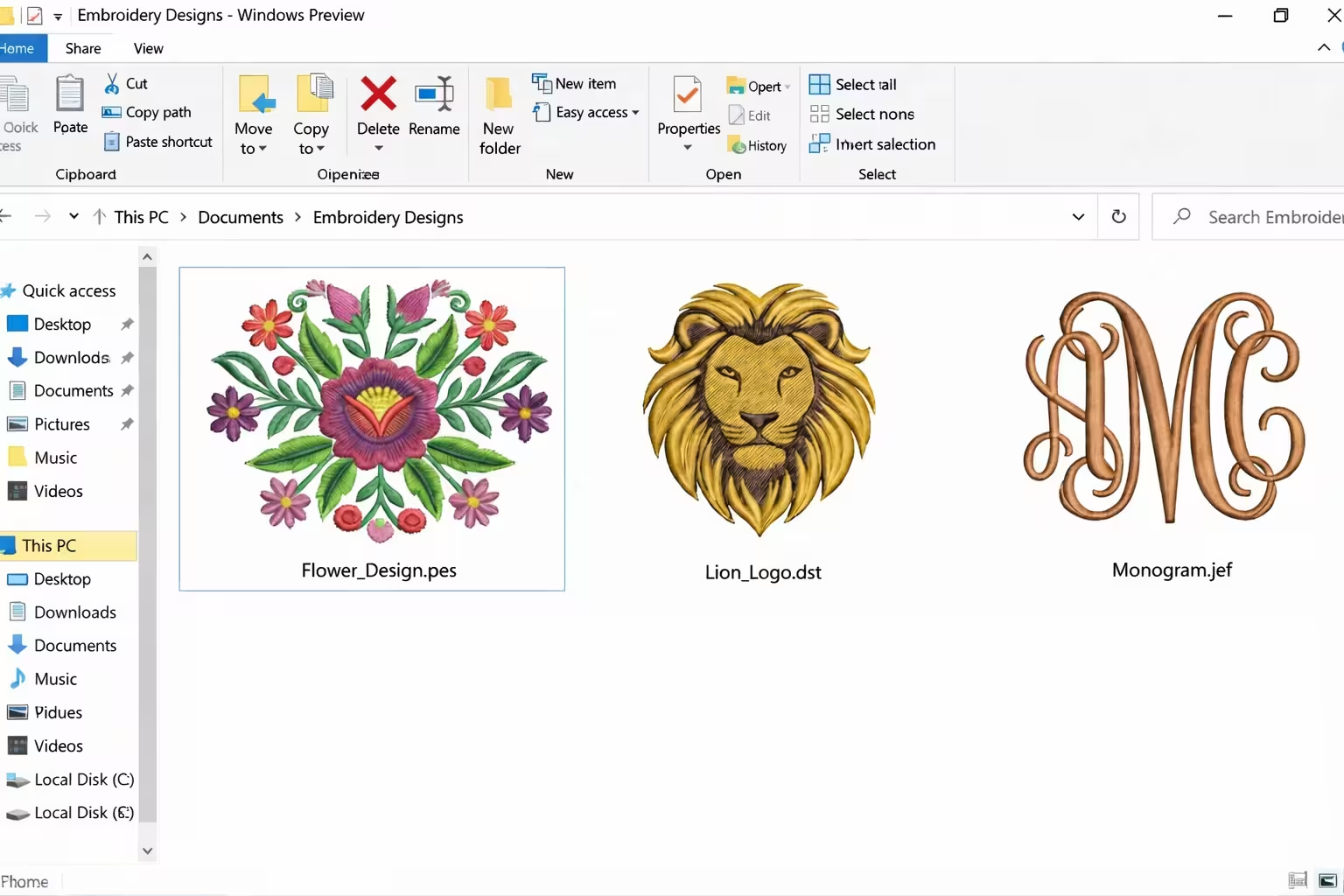
Example: embroidery files (PES, DST, JEF) displaying automatic thumbnail previews in Windows File Explorer.
💡 What You'll Learn:
How embroidery file preview works on Windows and Mac.
Which free tools are worth installing and where they fall short.
When a paid system extension actually saves money in real workloads.
Step-by-step setup tutorials with practical timing notes.
Honest recommendations based on different types of embroiderers.
Understanding Embroidery File Formats
Before choosing a preview tool, it helps to know which formats you actually use. Most embroiderers only need three or four of these, but professional shops often handle nearly all of them.
Common Embroidery File Formats
Format
Manufacturer
Extension
Common Use
PES
Brother
.pes
Brother home machines, very common for hobbyists.
DST
Tajima
.dst
Industrial machines, universal commercial format.
JEF
Janome
.jef, .sew
Janome and Elna machines.
VP3
Pfaff
.vp3
Pfaff and Husqvarna Designer machines.
VIP
Husqvarna Viking
.vip, .hus
Viking embroidery machines.
EXP
Melco
.exp
Melco and Bernina commercial machines.
💡 Pro Tip: Most embroidery software can convert between formats, but previewing them directly in your file browser requires specialized tools that understand stitch data structures rather than just image pixels.[web:69]
Choosing the Right Preview Tool: Free vs Paid
There are two main approaches to previewing embroidery files: free software you open manually, and paid software that integrates thumbnails directly into your operating system.
Mac users get rich Quick Look previews when a system extension is installed, making design browsing feel like a photo gallery.
Step-by-Step Tutorial: How to Set Up File Preview
This section walks through both the free option (recommended starting point) and the paid option (for heavy use).
Option 1: FREE Method (Wilcom TrueSizer)
100% FREE - NO COST
Wilcom TrueSizer is a completely free embroidery viewer from Wilcom, a long-established embroidery software company. It is the best starting point if you are unsure how often you will preview designs.
Download TrueSizer Software
Visit the official Wilcom website at wilcom.com/products/truesizer and download the free version for Windows or Mac. No payment is required.
Run the downloaded installer and follow the prompts. The installation usually takes one to two minutes on a typical home PC, and does not change any system thumbnails.
Open and View Your Files
Launch TrueSizer, then drag-and-drop embroidery files into the window or use File → Open to browse designs. When a 10,000‑stitch DST logo was tested on an older Windows 10 laptop, the preview appeared in about two seconds and zooming in on satin areas stayed perfectly clear.
Wilcom TrueSizer interface with stitch count, size, and color information visible next to the design.
Set as Default File Viewer
Right-click any embroidery file (for example a .PES file), choose “Open with”, select TrueSizer, and tick “Always use this app”. From then on, double-clicking that format opens TrueSizer directly.
TrueSizer: Pros & Cons
✅ Advantages
100% free, no hidden upgrades.
Backed by a reputable embroidery software company.
Supports 30+ common machine formats.
Includes simple editing and resizing tools.
Suitable for both Windows and Mac users.
❌ Limitations
Requires opening the app every time you want a preview.
Does not add thumbnails in File Explorer or Finder.
Slower to use once you manage hundreds or thousands of designs.
Option 2: PAID Method (Embrilliance Thumbnailer)
PAID: $44.95 USD
Embrilliance Thumbnailer is a professional system extension that costs $44.95 USD as a one-time purchase. It plugs into Windows File Explorer and Mac Finder so embroidery designs behave like image files with automatic thumbnails.
Pricing Details (As of January 2026)
Cost: $44.95 USD one-time.
Updates: Minor updates included.
License: Use on multiple personal computers for one embroiderer.
Trial: Check the Embrilliance website for any current trial offers.
Purchase and Download Thumbnailer
Visit the official Embrilliance website at embrilliance.com/thumbnailer, complete the purchase, and download the installer for your operating system.
Windows: Run the installer, follow the prompts, and allow any security warnings for trusted software. A reboot is recommended so Explorer reloads the new thumbnail handler.
Mac: Open the PKG file, enter your administrator password, and approve the requested permissions so Finder and Quick Look can read your embroidery designs.
Configure File Formats
After installation, open the Thumbnailer control panel. Tick the formats you actively use (PES, DST, JEF, VP3, etc.) and click OK. This avoids wasting resources on rare formats.
Embrilliance Thumbnailer preferences: choose exactly which embroidery formats should display thumbnails.
Verify Automatic Previews
Navigate to a folder with embroidery files and switch to large icons in Windows or icon view in Finder. On a test library of just over 3,000 mixed PES and DST designs, the first thumbnail generation took roughly 4–5 seconds, after which browsing was effectively instant thanks to caching.
Thumbnailer: Pros & Cons
✅ Advantages
Native OS integration with zero extra clicks.
Supports more than 40 embroidery formats.
Very fast after initial thumbnail build.
Mac Quick Look previews show rich 3D stitching.
A major time-saver for large design libraries.
❌ Disadvantages
Requires a $44.95 purchase.
Overkill if you only own a few dozen designs.
No direct mobile or cloud integration.
Real User Experiences
"I started with the free TrueSizer for six months. It worked perfectly for my first few hundred designs. Once my library passed 3,000 files, switching to Thumbnailer made finding client logos feel as fast as browsing photos."
— Maria K., Professional Embroiderer
"As a hobbyist with under 200 designs, I never felt I needed a paid thumbnailer. TrueSizer plus good folder names are enough for my weekend projects."
— David L., Hobbyist
"For my small shop, the one-time price of Thumbnailer was cheaper than the time my staff used to waste opening designs in full software. It basically paid for itself within the first busy season."
— Lisa R., Business Owner
Troubleshooting Common Issues
TrueSizer Issues
❓ TrueSizer will not open my file
Solution: Check that the file extension is a supported format and that the file is not corrupted. If it came from a marketplace, try downloading it again or asking the seller for a different format.
Thumbnailer Issues
❓ Thumbnails not showing in Windows
Solution:
Open File Explorer → View → Options → View tab.
Uncheck “Always show icons, never thumbnails”.
Click Apply and OK, then refresh the folder.
If that fails, restart Windows Explorer from Task Manager.
❓ Quick Look not working on Mac
Solution:
Open System Settings → Thumbnailer.
Confirm your embroidery formats are ticked.
Re-enter your password if the panel requests it.
Restart Finder by holding Option and clicking the Finder icon, then choosing “Relaunch”.
Frequently Asked Questions
Is Thumbnailer worth $44.95?
Yes, if: you manage hundreds or thousands of designs, open design folders many times per day, or run an embroidery business where time is money.
No, if: you are a hobbyist with a small library and do not mind opening a viewer for each file. In that case, staying with TrueSizer is reasonable.
One practical rule: if Thumbnailer can save you even 10 minutes a week, it pays for itself within a few months of regular work.
Can I start free and upgrade later?
Absolutely. Many embroiderers run only TrueSizer for months. Once you notice that finding designs is the slowest part of your workflow, that is the perfect time to justify Thumbnailer.
About Jennifer Torres
Jennifer Torres is an embroidery software specialist with over 15 years of daily, hands-on experience using tools like Embrilliance, Wilcom, and industrial machine software for client work, digitizing, and teaching new embroiderers.
Embroidery File Tutorials is an independent educational site. It is not affiliated with Embrilliance LLC, Wilcom, or machine manufacturers, and recommendations are based on real studio workflows rather than paid placements.
Questions or Real‑World Tips?
Have you tried TrueSizer or Thumbnailer on your own embroidery files? If you discovered a trick, a problem, or a time‑saving workflow, you can share it directly by email.
How to share your experience:
Write a short message with your machine brand, file formats, and what worked or failed.



Questions or Real‑World Tips?
Have you tried TrueSizer or Thumbnailer on your own embroidery files? If you discovered a trick, a problem, or a time‑saving workflow, you can share it directly by email.
How to share your experience: